Dobby Fabric in a Tech Pack: What to Specify (Weave, Yarn, Density) So Your Mill Weaves What You Designed
Md.shakibul islam Shawn
Author
"Dobby shirting, navy, 40s × 40s." That one line sits in thousands of tech packs, and it is the reason thousands of strike-offs come back wrong.
A dobby fabric is defined by a pattern that is woven in, not printed on. If the weave, the yarn and the density are not written down exactly, the mill fills the gaps with its own habits. The result looks "close" on a lab dip card and wrong on the rack.
This guide shows what a dobby fabric specification needs, who uses each part (designer, brand, merchandiser, textile engineer, mill), and how to build it in the free ThreadPack Dobby Fabric Generator so the same data goes into your tech pack and onto the mill's loom sheet.
What makes a fabric "dobby"
A dobby loom controls a limited number of shafts (also called harnesses or heald frames). Each shaft lifts a chosen group of warp threads (ends). Because every pick (weft thread) can lift a different combination of shafts, the loom can weave small geometric patterns: pin dots, diamonds, honeycomb, bird's eye, herringbone, small checks and stripes with texture.
Compare that with the alternatives:
- Plain weave and simple twills repeat on 2–4 shafts. A basic loom can do them.
- Dobby gives you roughly 8 to 32 shafts of control, enough for small repeating motifs.
- Jacquard controls each end individually and is used for large, non-repeating designs such as brocade.
So "dobby" is not one fabric. It is a family, and the pattern lives in a table of numbers called the weave draft. That table is exactly what is missing from most tech packs.
The five things a mill needs to weave your dobby
1. The weave (the draft)
The draft says which shaft lifts on which pick. It has four parts: threading (which shaft each end goes through), tie-up, treadling (the order of picks) and, on electronic dobbies, the peg plan or lift plan.
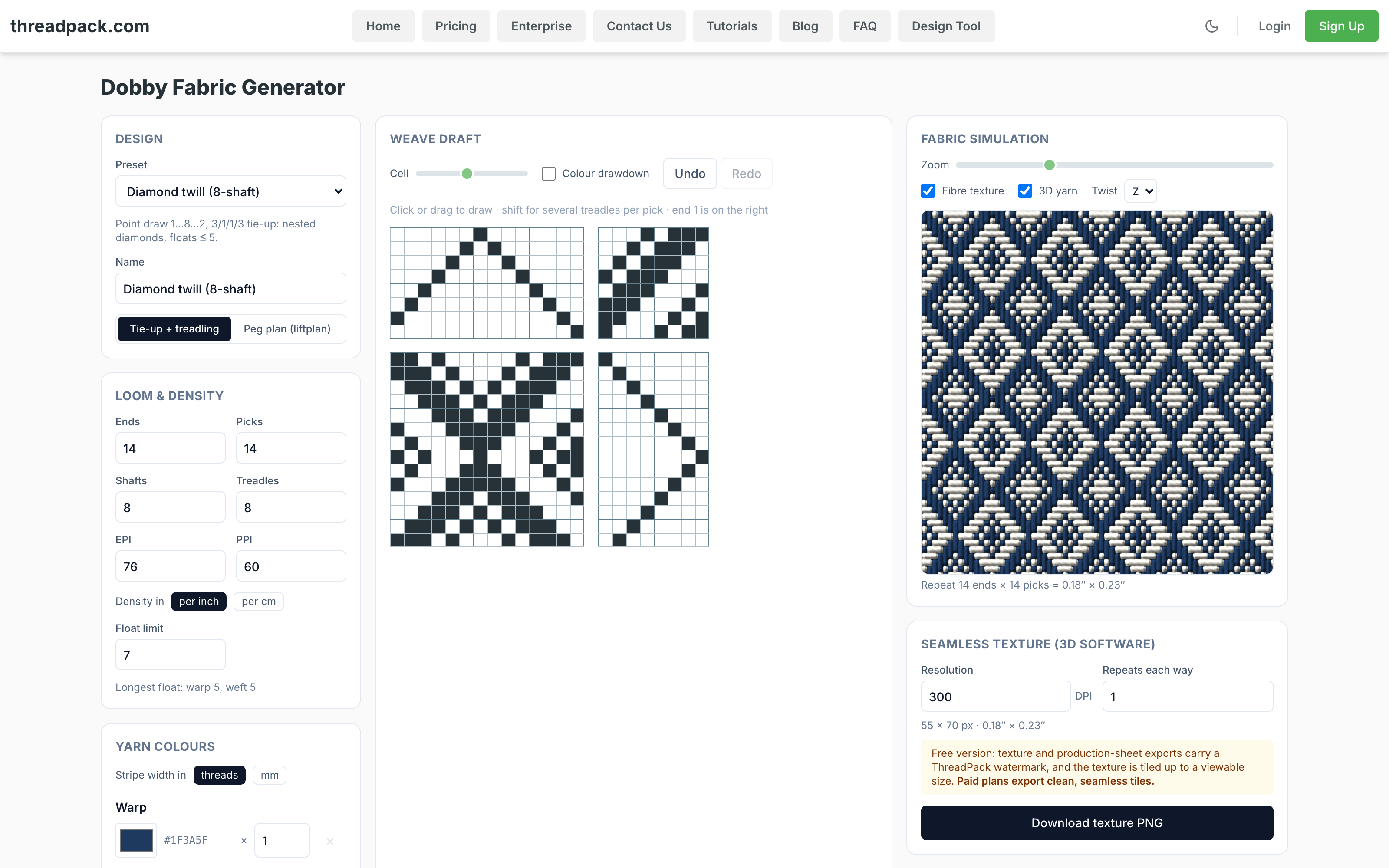
In ThreadPack you can start from a preset (plain, 2/1 and 3/1 twill, satin, basket, herringbone, honeycomb, bird's eye, houndstooth, gingham, oxford, poplin, gabardine, denim and more) and then draw or edit the draft cell by cell. You can switch between tie-up + treadling and a peg plan, and export the result as a WIF file, the standard weaving-software format.
Who needs it: the mill's design and sampling team. A brand rarely draws a draft, but a brand that can show one removes a week of back-and-forth.
2. The yarn (count, plies, twist, colour)
Yarn is the second half of the fabric. "40s" means nothing until you also say which counting system and how many plies.
ThreadPack supports the systems a sourcing team really meets: Ne (cotton), Nm (metric), Tex, Denier, Nel (linen), Nw (worsted) and Ys (woollen). You set warp and weft separately, plus plies (2/40 is two plies of 40s) and an optional twist in turns per metre.
Write warp and weft separately every time. Fine warp with a heavier weft is common in shirtings, and a single combined "40s" line hides that.
Who needs it: the textile engineer and the yarn buyer. Count, plies and twist drive cost, hand feel, strength and how sharp the pattern looks.
3. The density (EPI and PPI)
EPI is ends per inch (warp density). PPI is picks per inch (weft density). Together with yarn count they decide weight, drape, opacity and how crisp the dobby pattern appears.
If your team works in metric, the tool switches the display to ends and picks per cm. A tight, fine-yarn dobby shirting and an open, coarse one can share the same weave and look nothing alike. Density is what separates them.
Who needs it: everyone. It is the single most common missing line in a fabric spec.
4. The loom set-up (reed, denting, width, selvedge)
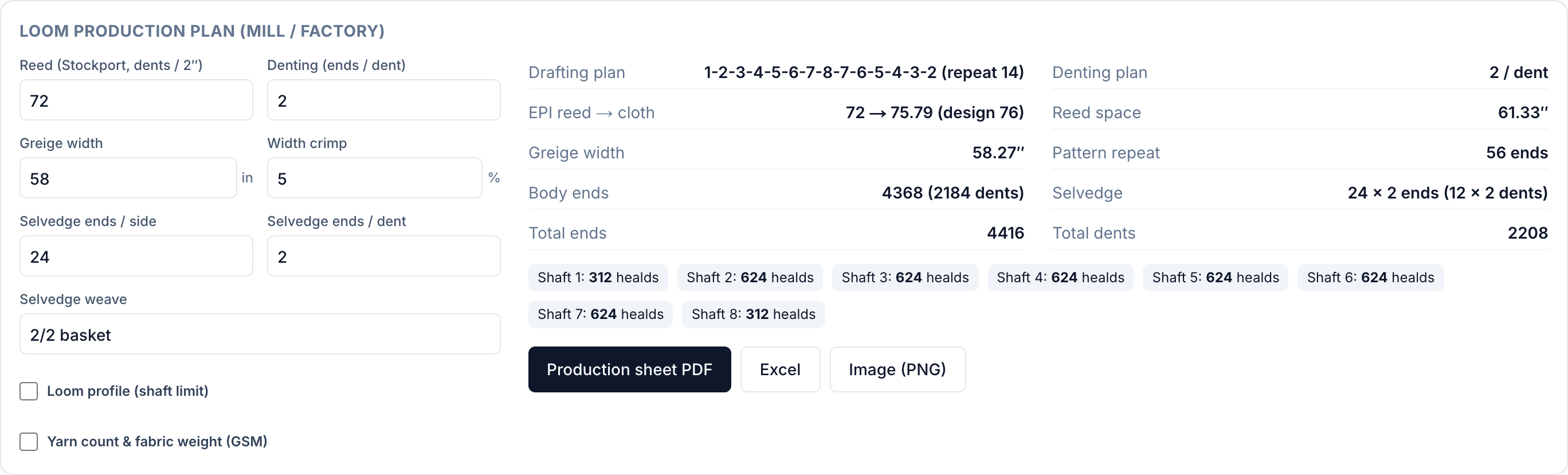
This is where a designer's idea meets a loom's limits. ThreadPack builds a production plan from your design:
- Reed count and denting plan (ends per dent). Reed count follows the Stockport convention, dents per 2 inches, which is the common convention in Bangladesh and India mills.
- Reed space, cloth width and crimp (the width the cloth loses between reed and finished greige).
- Total ends, rounded so the pattern and the colour stripe close properly at the selvedge.
- Healds per shaft and the drafting plan.
- Selvedge (ends each side, ends per dent, weave).
It also flags problems, such as a design needing more shafts than the loom has, or floats longer than the limit you set, before anyone threads a loom.
Who needs it: the mill's weaving master and the textile engineer. A brand can leave these blank, but a pack that already shows a sensible reed and width is quoted faster and more accurately.
5. The colour order (warp and weft)
A dobby pattern in one colour and the same pattern in a yarn-dyed stripe are different cloths. Write the colour order for one repeat for both warp and weft, with the number of threads in each run. The tool turns your stripe sequence into a threads-per-colour table, so the mill reads the same sequence you drew.
One design, five readers
| Who | What they use it for |
|---|---|
| Fashion designer | Draws the weave and colour visually, previews it as simulated cloth and in 3D, and gets the right look before a single metre is woven. |
| Brand / product developer | Pastes a complete fabric spec into the tech pack instead of a vague name, and compares quotes on equal terms. |
| Merchandiser / sourcing | Sends one spec sheet to several mills and gets comparable prices, because every mill is quoting the same cloth. |
| Textile engineer | Checks density, yarn count, floats, reed and denting, and estimates yarn consumption from the production data. |
| Mill / manufacturer | Gets the draft, peg plan or WIF file, reed and denting, ends and picks, and colour order, ready for the loom or the CAD system. |
From the generator into your tech pack
You do not have to retype anything.
- Design it. Open the Dobby Fabric Generator, choose a preset or draw your own draft, and set ends, picks and shafts.
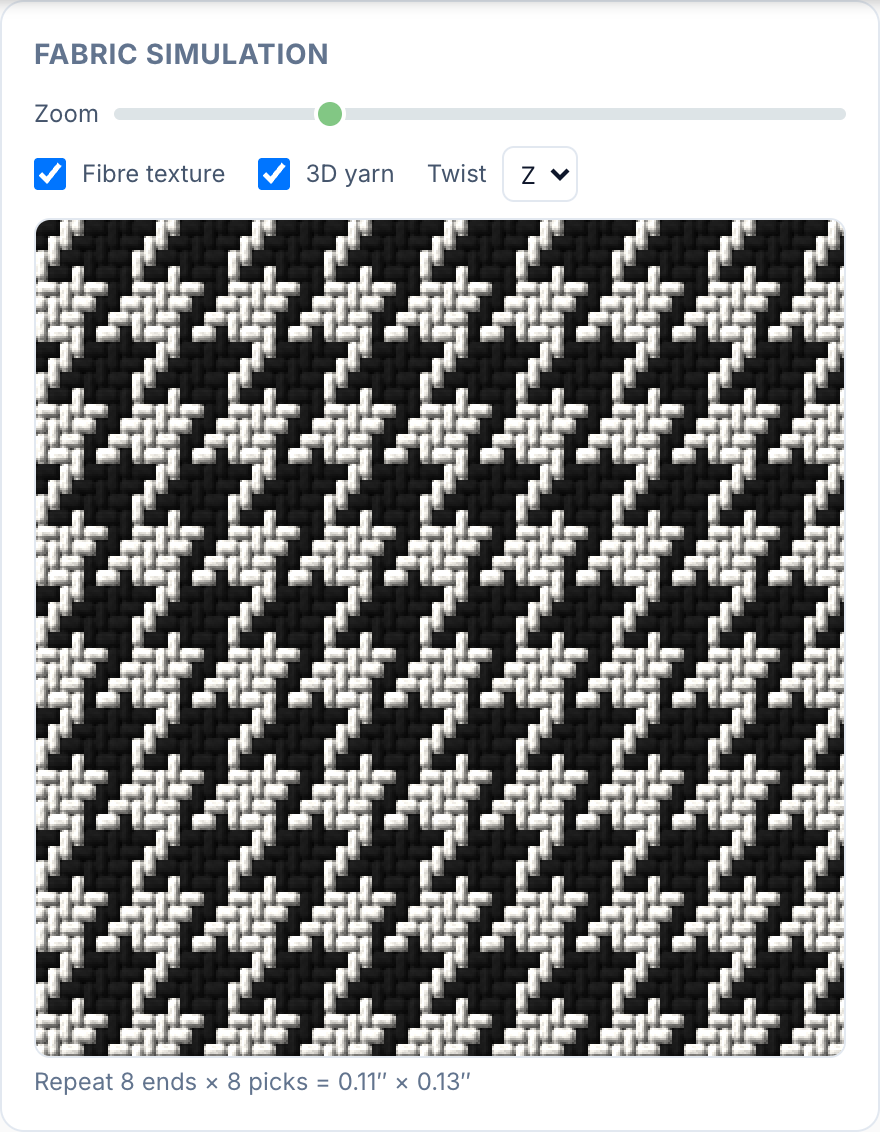
- Set density and yarn. Enter EPI and PPI, then warp and weft count, plies and twist. Turn on the 3D yarn view to see round threads over and under their crossings.
- Set the colours. Build the warp and weft colour sequences.
- Add the production data. Reed, denting plan, cloth width, crimp and selvedge. Fix anything flagged under "check before weaving".
- Export for the right person.
- Production sheet as PDF, PNG or Excel for the mill: construction, drafting plan, healds per shaft, denting plan, colour sequence, peg plan.
- WIF file for weaving software.
- Seamless texture PNG and PBR maps (normal, roughness, displacement) for 3D tools such as CLO3D or Blender, so the digital sample shows the real weave.
- Insert into your tech pack. Inside the ThreadPack tech pack editor, open the Dobby tool from the toolbar and use Insert to place the fabric image on your page, next to your Bill of Materials.
Then put the fabric on your BOM line with the construction written out. Our guide to building a garment BOM shows how a fabric line should read, and the measurement spec sheet guide covers the measurement side of the same pack.
A worked example: yarn-dyed dobby shirting
Here is how the fabric line changes once the fabric is specified properly.
Before: "Dobby shirting, blue/white, 40s × 40s."
After:
| Field | Value |
|---|---|
| Weave | Dobby, diamond twill, 8 shafts, draft attached (WIF + PDF) |
| Warp | Ne 2/40, yarn-dyed blue/white, 1 blue : 1 white repeat |
| Weft | Ne 40/1, white |
| Density | 76 EPI × 60 PPI (finished target) |
| Reed | per mill's loom sheet; denting plan attached |
| Greige width | to suit 58" finished, crimp noted |
| Selvedge | 24 ends each side, plain |
| Pattern repeat | stated in inches, checked on the production sheet |
| Colour | attached swatch + warp/weft colour sequence |
(The numbers are an illustrative set, not a recommendation. Use the density and counts your fabric needs.)
The second version has no gaps for the mill to fill with a guess, and it can be quoted line by line.
Common mistakes in dobby specs
- Calling it "dobby" and stopping there. Say which weave and attach the draft.
- Giving one yarn count for warp and weft. Always list both.
- Forgetting plies. 2/40 and 40/1 are different yarns.
- Leaving EPI and PPI blank. The mill then picks a density that suits its loom, not your hand feel.
- Ignoring float length. Long floats snag and pill. Set a float limit and check it before sampling.
- Skipping the repeat size. A motif that is 1/2" on the screen and 1" in cloth changes the whole look. State repeat dimensions.
- Colour as a name only. "Navy" is not a spec. Give the warp and weft colour order with thread counts.
FAQ
What is dobby fabric used for?
Dobby is common in shirting, trousers, jackets, home textiles and uniform fabrics, wherever a small woven texture or pattern is wanted without printing.
What is the difference between dobby and jacquard?
Dobby controls groups of ends through a limited number of shafts and suits small repeating patterns. Jacquard controls each end individually and suits large, detailed, non-repeating designs.
What do EPI and PPI mean in a fabric spec?
EPI is the number of warp ends per inch. PPI is the number of weft picks per inch. With yarn count, they determine the fabric's weight, drape and appearance.
Do I need to know weaving to use the Dobby Fabric Generator?
No. You can start from a preset weave, change colours and density, and see the cloth simulated. Textile engineers can go further and edit the draft, peg plan, reed and denting.
Is the Dobby Fabric Generator free?
Yes, it is free to use. Exports on the free plan carry a ThreadPack watermark; paid plans export clean files. See pricing for current details.
Can I send the design to a mill?
Yes. Export the production sheet (PDF, PNG or Excel) and the WIF file. The sheet carries the construction, drafting plan, denting plan and colour sequence, so the mill can quote and set up from it.
Can I use the fabric in 3D software?
Yes. Export a seamless texture PNG plus normal, roughness and displacement maps and use them in tools such as CLO3D or Blender.
Try it
Open the free Dobby Fabric Generator, build your fabric, and attach the production sheet to your next tech pack. Mills quote faster, samples come back closer, and everyone reads the same fabric.
Explore ThreadPack
Related resources and tools to help you move faster.